
The Paperlike Philosophy: Redefining the Digital Canvas

For nearly a decade, the iPad has been celebrated as a revolutionary tool for creativity and productivity. Its powerful processors, stunning Retina displays, and the precision of the Apple Pencil make it an unparalleled device. Yet, for all its technological prowess, a fundamental problem lingered: glass. Writing or drawing on a smooth, slick glass surface feels unnatural. The Apple Pencil skids and glides with a lack of control, making handwriting messy and sketching imprecise. It represents a disconnect between the digital tool and the tactile satisfaction of traditional media.
The Genesis of a Paper-Feel
Paperlike emerged from this very frustration. Founded in 2017 by Jan Sapper and Julian Miller in Berlin, Germany, the company set out to solve a simple, yet profound, problem: how to make an iPad feel like paper. The journey began when founder Jan Sapper experienced frustration with his first iPad Pro. The device had incredible potential, but the Apple Pencil experience on its glass screen was deeply unsatisfying. The stylus slid uncontrollably, and the overall feeling was disconnected from the creative process. Convinced someone would fix this, he waited—but nobody did.
Driven by his own need, Sapper launched the first Paperlike on Kickstarter. The overwhelming support from the iPad community validated his vision and marked the birth of a company dedicated to enhancing the digital creative process. What started as a Kickstarter campaign has evolved into a global movement, with over 2.4 million customers who can’t imagine using their iPads without it.
The Magic Behind Paperlike 3: Nanodots Technology
At the heart of the Paperlike experience is its proprietary Nanodots surface technology. This is the “secret sauce” that sets Paperlike apart from generic matte screen protectors. The technology represents a clever solution to a complex problem.
Imagine a surface covered in thousands of microscopic beads, invisible to the naked eye, yet tactile to the Apple Pencil tip. These “Nanodots” create a subtle vibration as the pencil glides across them, providing the perfect amount of resistance and friction you’d expect from high-quality paper. This haptic feedback provides the control to write neatly, draw precise lines, and feel a genuine connection between hand and digital creation. The experience is modeled after the sensation of premium Japanese paper, striking the ideal balance between smooth and rough.
There’s a common misconception that a textured screen protector will degrade the iPad’s stunning display quality, creating a grainy, “rainbow” effect. This is where Paperlike’s engineering truly shines. The Nanodots technology is designed to allow light to pass through and around the micro-beads with minimal disruption, preserving visual clarity and vibrant colors. The goal is for your iPad to “FEEL like paper, not look like paper.” This commitment to visual fidelity ensures that while your stylus feels like it’s on paper, your eyes still enjoy the brilliance of the Retina display.
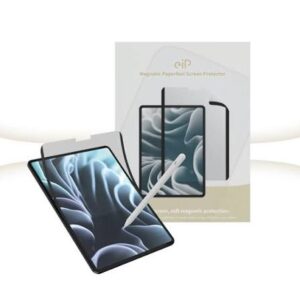
This precision engineering is a testament to Paperlike’s European roots. The screen protector is meticulously engineered in Germany and manufactured in Switzerland, a country renowned for its precision in watchmaking and high-end manufacturing. The choice of material is equally critical. Paperlike 3 uses a high-grade PET base with Optical Silicon adhesive, engineered to be ultra-thin. At approximately 0.095 mm thick—less than the width of a human hair—it meets Apple’s stringent requirements for Apple Pencil support, ensuring zero latency, no wobble, and pixel-perfect responsiveness. The durable design also provides robust protection for your iPad screen from the inevitable scratches, scuffs, and micro-marks of daily use.
The Butterfly™ Application System: Redefining Installation
One of the most common anxieties surrounding screen protectors is the installation process. The fear of bubbles, misalignment, and dust particles is enough to make anyone hesitate. Paperlike has addressed this head-on with a revolutionary solution: the Butterfly Application System.
This patent-pending system represents a fundamental rethinking of screen protector installation. Unlike traditional methods that rely on plastic alignment frames and expose both the adhesive and screen surface to dust, the Butterfly System creates what Paperlike calls a “Clean Room Effect”—a sealed, four-layer installation environment that captures dust particles and guides perfect placement in one seamless motion. The system is designed to make installation stress-free, bubble-free, and perfectly aligned every time.
The key elements of the Butterfly Application System include:
-
Full-Surface Dust Catcher: Perhaps the most ingenious element, this helps remove every last speck of dust from the screen’s surface, preventing those irritating bubbles often caused by trapped particles.
-
Clean Room Effect: The application process is designed to simulate a “clean room” environment, minimizing the chance of dust interfering during the critical moment of placement.
-
Precision Alignment Tools: Instead of guessing, the system provides tools to create “hinges,” allowing you to perfectly align the protector before laying it down, eliminating the risk of it being crooked.
-
Reusable Helper Tool: This tool aids in the smoothing-out process, ensuring a seamless and secure adhesion.
-
Interactive On-Screen Guide: Customers can follow along with a detailed video or interactive guide, taking the guesswork out of every single step.
The result is an installation process that demystifies a once-daunting task. As one reviewer noted, “It was really easy to apply and the how-to videos are great”. Another customer, referencing the new system, called the installation process “million times easier than last time”. By making application foolproof, Paperlike ensures that users can immediately enjoy the benefits of the product without the frustration of a botched install.
The Paperlike Ecosystem: Tools for Every Creator
While the screen protector is the flagship product, Paperlike has expanded its ecosystem to include a range of accessories designed to complement and enhance the paper-feel experience. These tools are designed for “creators and doers,” catering to the needs of digital artists, students, and professionals alike.
Paperlike Pencil Tips
The Apple Pencil is essential, but its smooth, glossy plastic tip can feel slippery, even on a textured screen. Paperlike’s Pencil Tips are a direct replacement for the standard Apple Pencil tip. They are engineered to provide a better grip and a more controlled writing and drawing experience. The material is selected for its durability, wearing out slower than standard Apple Pencil tips—a significant advantage for heavy users. Using a Paperlike Pencil Tip in conjunction with the Paperlike Screen Protector maximizes the haptic feedback, delivering that satisfying paper-feel the brand is known for.
The compatibility is extensive, working with all generations of the Apple Pencil, making it a versatile addition for many iPad users.
Paperlike Bumper Case
An iPad, especially a powerful one used for creation, needs reliable protection. The Paperlike Bumper Case is a multi-functional, high-quality protective case. Key features often highlighted by users include a secure pencil flap to store the Apple Pencil safely and a simple folding operation that acts as a stand for different viewing and drawing angles. It’s designed to protect the device without adding unnecessary bulk, perfectly aligning with the brand’s minimalist, functional aesthetic.
Paperlike Cleaning Kit
Maintaining a pristine screen is essential for both clarity and the optimal performance of the screen protector. The Paperlike Cleaning Kit provides everything needed to keep your iPad and its accessories clean and free from smudges and oils, ensuring that your creative workflow is never interrupted by a dirty screen.
The Customer Verdict: What Real Users Say
The best testament to Paperlike’s success is the overwhelming feedback from its community of users. With over 2.4 million customers, the reviews consistently echo the brand’s core value proposition: a transformative experience that makes the iPad feel like a natural tool for creation.
On the company’s website and across retail platforms, customers rave about the paper-feel. Reviews commonly cite the improved precision and control for drawing and note-taking. One satisfied customer exclaimed, “Feels like paper”. Another long-term user highlights the product’s value, calling it “Essential for Apple pencil”. The sentiment is best captured by a review simply stating it is “the game-changer for drawing and writing”. Many also praise the easy installation process, with one user noting the instructions “calmed my anxiety and were easy to follow”.
However, no product is without its critics. Some of the most common criticisms of Paperlike focus on two key areas: installation difficulty and the trade-off in display quality.
Installation Woes: While the newer Butterfly System has been widely praised, several reviews of older versions describe the installation as fiddly and frustrating, leading to bubbles or even a ruined protector. Critics noted that the process is not as simple as the video makes it seem and that for the premium price, a failure is a costly loss. However, it’s important to note that these reviews often reference the older application system. The new Butterfly™ Application System appears to have directly addressed these complaints, making a “flawless finish” much more attainable for the average user.
The Paper vs. Display Quality Dilemma: The other main criticism is the compromise on screen clarity. Matte screen protectors, by their nature, introduce a slight grain and can alter the vibrancy of the display. Some users found this to be a significant drawback, stating that the “display looks much worse underneath—less vibrant colours, but mainly a bit blurry and less contrasting text”. For users whose primary use case isn’t handwriting or drawing, this compromise may not be worth it. However, for those for whom the tactile, paper-feel experience is paramount, the feedback remains overwhelmingly positive, viewing it as a necessary and worthwhile trade-off for the enhanced control and comfort.
Sustainability: A Core Value at Paperlike
In an increasingly eco-conscious world, Paperlike is committed to sustainability, aligning its production and packaging with a clear environmental responsibility. The Paperlike 3 packaging is a testament to this commitment, being entirely 100% plastic-free and made from fully recyclable paper and cardboard. The brand has also adopted a lightweight, compact design to reduce shipping volume and carbon emissions with every delivery.
Furthermore, Paperlike’s ethos of building durable products that last contributes to sustainability. By engineering a screen protector that is more scratch-resistant and resistant to “polishing” over time, they reduce the frequency with which customers need to replace the product, thereby minimizing long-term waste. This is a crucial point: a premium product that lasts three or four years, as some reviews mention, is inherently more sustainable than a cheaper alternative that needs to be replaced every few months. Even the ultra-thin design uses the minimum amount of high-grade PET material possible, which is one of the most widely recycled plastics globally. This comprehensive approach to sustainability shows that Paperlike is not just focused on creating great tools but also on being a responsible corporate citizen.
Setting the Record Straight: Dispelling Common Myths
With a product that has generated as much discussion as Paperlike, a few myths and misconceptions have surfaced. It’s worth addressing them directly to ensure potential buyers have a clear picture of what to expect.
Myth 1: Paperlike Leaves Watermarks or Imprints
Some new users have reported seeing watermarks, imprints, or sticker residue on their screen protector. A common misconception is that this is a permanent part of the product or a defect. Paperlike clarifies that the protector is a transparent, matte film with no designs or watermarks printed on it. Any visible marks are simply remnants of the protective layers that the screen protector is packaged with. The installation process involves peeling off both the front and back protective layers. If a user still sees marks, it means they haven’t fully removed one of these layers, and a simple, careful peel will solve the issue, revealing the clean, matte Paperlike surface underneath.
Myth 2: Paperlike is Too Rough and Wears Out Pencil Tips Quickly
Some critics have described the texture as too rough, causing a “sensory nightmare” and claiming it will quickly destroy Apple Pencil tips. However, Paperlike’s engineering is specifically designed to create a balanced, paper-like friction that is gentle on the Pencil tip. With Paperlike , the company has optimized the surface for minimal tip wear while maintaining the signature paper-feel. In fact, the company notes that its customers, on average, replace their Apple Pencil tips only every six months. This suggests that the fear of rapid wear is largely unfounded for most users.
Conclusion: Is Paperlike Right for You?
The Paperlike experience is more than just a screen protector; it’s a philosophy. It’s the belief that the digital and the tactile don’t have to be at odds. It’s a solution for creators, students, and professionals who have felt the disconnect between their ideas and the tools they use to bring them to life.
For those who primarily use their iPad for writing, drawing, taking notes by hand, or any task that relies on the precision of the Apple Pencil, Paperlike is nothing short of transformative. It turns the iPad into a canvas that feels natural, providing the control, friction, and haptic feedback that makes handwriting legible and drawing a joy. It adds a layer of scratch protection for your valuable device and, as many users attest, significantly enhances the overall creative flow. The new Butterfly™ Application System has effectively eliminated the anxiety of installation, making it a more accessible and user-friendly product than ever before.
However, it’s not for everyone. If your primary use of the iPad is for media consumption, like watching movies or editing photos where absolute color accuracy and pristine clarity are paramount, the trade-off in visual fidelity might be too great. The matte surface will slightly alter the experience—a compromise that many are happy to make for the benefit of a paper-like feel, but one that is crucial to acknowledge.
Ultimately, Paperlike has carved out a unique and essential niche in the iPad accessory market. It solves a fundamental problem for millions of users and has built a passionate community around its products. By visiting https://paperlike.com/, you step into this ecosystem of creators and doers, where the digital world is made a little more human, one stroke at a time. The company’s journey from a frustrated founder’s idea to a global phenomenon with millions of customers is a powerful story of innovation driven by a simple, yet powerful, vision: to make your iPad feel like paper.